
Logitech M185 Wireless Mouse Review for Office and Home Use
Finding a reliable wireless mouse for everyday tasks can be challenging when there are hundreds of options available. If you need an affordable, simple, and dependable mouse for office work, online classes, web browsing, and home computing, the Logitech M185 Wireless Mouse is one of the most popular choices. Designed for users who value convenience and reliability over advanced features, this compact wireless mouse has remained a favorite among students, professionals, and home users for many years.
In this Logitech M185 Wireless Mouse review, we will explore its design, performance, battery life, connectivity, and overall value to help you decide whether it is the right mouse for your needs.
Logitech M185 Wireless Mouse Overview
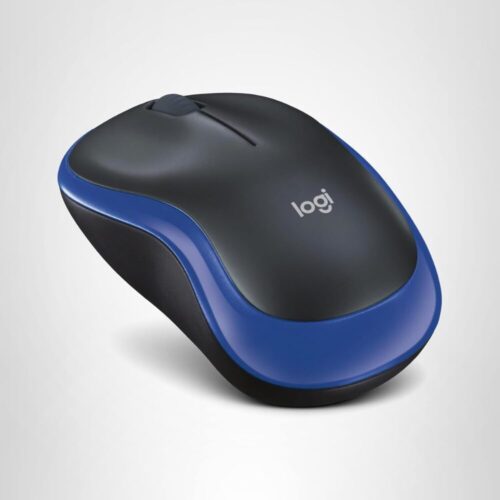
The Logitech M185 is a compact wireless mouse that uses a 2.4 GHz wireless connection through a USB nano receiver. It is designed to provide smooth navigation without the clutter of cables. The mouse features a comfortable ambidextrous design, making it suitable for both left-handed and right-handed users.
Unlike gaming mice that focus on high DPI sensors and customizable buttons, the M185 focuses on simplicity, reliability, and long battery life. It is ideal for office workers, students, remote employees, and home users who need a dependable wireless mouse for daily tasks.
Key Features of Logitech M185 Wireless Mouse
Reliable 2.4 GHz Wireless Connection
One of the strongest features of the Logitech M185 is its reliable wireless connectivity. The included nano receiver connects instantly to your computer and provides a stable connection with minimal delays or interruptions. The plug-and-play setup means there is no need to install software or drivers. Simply plug the receiver into a USB port, insert the battery, and start using the mouse immediately.
Comfortable Ambidextrous Design
The Logitech M185 features a symmetrical shape that works comfortably for both left-handed and right-handed users. Its compact size makes it easy to carry in a laptop bag, backpack, or travel case. The ergonomic curves provide a natural grip for everyday use, making it suitable for long hours of office work, studying, and internet browsing.
While the Logitech M185 is designed primarily for affordability and everyday productivity, users who spend long hours working on a computer should also consider the importance of ergonomics. An ergonomic wireless mouse can help reduce hand strain, improve wrist positioning, and enhance overall comfort during extended work sessions. Understanding the science behind ergonomic mouse design can help users choose the right device for their needs and create a more comfortable workspace.
Long Battery Life
Battery performance is one of the biggest advantages of this wireless mouse. Logitech claims that the M185 can deliver up to 12 months of battery life on a single AA battery under normal usage conditions. The automatic sleep mode helps conserve power when the mouse is not in use, reducing the need for frequent battery replacements.
Optical Tracking Technology
The optical sensor provides accurate cursor control on most common surfaces. Whether you are working on documents, browsing websites, managing spreadsheets, or attending virtual meetings, the tracking performance remains smooth and responsive. Although it is not designed for competitive gaming, it performs very well for productivity and general computing tasks.
Compact and Lightweight
Many users prefer the Logitech M185 because of its lightweight construction. The compact design makes it an excellent travel mouse for people who frequently work from different locations. Its small footprint also helps maintain a clean and organized workspace.
Performance for Office Use
The Logitech M185 performs exceptionally well in office environments. Tasks such as:
- Word processing
- Spreadsheet management
- Email communication
- Web browsing
- Video conferencing
- Presentation creation
can all be completed comfortably with this mouse.
The responsive clicks and smooth scrolling wheel make navigation easy throughout the workday. Since it does not require any software installation, it is especially useful in corporate environments where software installation permissions may be limited.
For employees working remotely, the M185 provides a reliable wireless experience that helps maintain productivity without unnecessary complications.
Performance for Home Use
At home, the Logitech M185 is equally useful for a variety of activities, including:
- Online learning
- Social media browsing
- Watching videos
- Online shopping
- Light photo editing
- General computer use
Its simple design allows family members of all ages to use it without a learning curve. The wireless functionality also reduces desk clutter and improves overall convenience.
Whether you are helping children with schoolwork or managing household tasks on your computer, the M185 offers dependable performance.
Build Quality and Durability
Logitech has built a strong reputation for manufacturing reliable computer accessories, and the M185 continues that tradition. The mouse feels sturdy despite its lightweight design. The buttons provide satisfying tactile feedback, and the scroll wheel operates smoothly during daily use.
Many users choose Logitech products because of their long-term reliability, making the M185 a practical investment for budget-conscious buyers.
Compatibility
The Logitech M185 supports multiple operating systems, including:
- Windows
- macOS
- Linux
- ChromeOS
This broad compatibility makes it suitable for desktops, laptops, office computers, and educational devices. The universal support means users can easily switch between different systems without needing additional software.
Pros and Cons
Pros
- Affordable price point
- Reliable wireless connectivity
- Easy plug-and-play setup
- Long battery life
- Comfortable ambidextrous design
- Compact and travel-friendly
- Trusted Logitech build quality
- Compatible with multiple operating systems
Cons
- No Bluetooth connectivity
- No programmable buttons
- Not designed for gaming
- Fixed DPI settings
- Limited advanced customization options
Who Should Buy the Logitech M185?
The Logitech M185 Wireless Mouse is an excellent choice for:
- Office workers
- Students
- Teachers
- Remote employees
- Home computer users
- Laptop users
- Travelers seeking a portable mouse
However, gamers, graphic designers, and power users who require advanced customization or high-precision sensors may prefer a more feature-rich mouse.
Final Evaluation
The Logitech M185 Wireless Mouse remains one of the best budget wireless mice available for office and home use. It combines reliable wireless performance, excellent battery life, simple setup, and comfortable everyday usability in an affordable package.
While it lacks premium features such as Bluetooth connectivity, programmable buttons, and adjustable DPI settings, it excels at the tasks most users perform every day. For students, professionals, and home users looking for a dependable wireless mouse without spending a fortune, the Logitech M185 is a practical and worthwhile choice.
If your primary goal is to find a reliable wireless mouse for productivity, web browsing, online learning, and everyday computing, the Logitech M185 continues to be a strong recommendation.
Frequently Asked Questions (FAQs)
Does the Logitech M185 require software installation?
Is the Logitech M185 compatible with Windows and Mac?
Can the Logitech M185 be used for gaming?
Does the Logitech M185 support Bluetooth connectivity?
Choosing the Right Tools for Work and Gaming
Choosing the right wireless mechanical keyboard is about more than just typing speed. A quality keyboard can improve comfort, reduce typing fatigue, and enhance productivity during long work sessions or gaming marathons. Whether you are a professional working from home or a gamer seeking responsive keystrokes, understanding the benefits of different keyboard designs and switch types can help you make a more informed purchasing decision and create a more efficient workspace.


